

You may watch the Professional Development videos from our Learning Support Professionals at Bright Islands Education to help you understand Bright Islands Complete Comprehension (CoCo) better, click here.
Bright Islands CoCo is a comprehensive diagnostic and instructional reading comprehension program. The foundation of this program is the 12 reading strategies used to diagnose a student's reading comprehension ability and improve it through guided instruction.
By giving teachers more time to teach, helping students learn more independently and intuitively, and allowing parents to be involved in their child's learning, Bright Islands CoCo integrates the whole school – bringing together parents and teachers to help students become better. The web application is structured similarly, with teacher/parent and student/child portals both available. Students read a story – using their laptop, tablet, desktop PC or smartphone – and complete a series of multiple-choice questions and open-ended questions related to what they have just read. The module then automatically analyses the student’s answers to determine their grasp of the 12 reading comprehension strategies, and delivers detailed reports of student, class or whole-school performance via the teacher subscription.
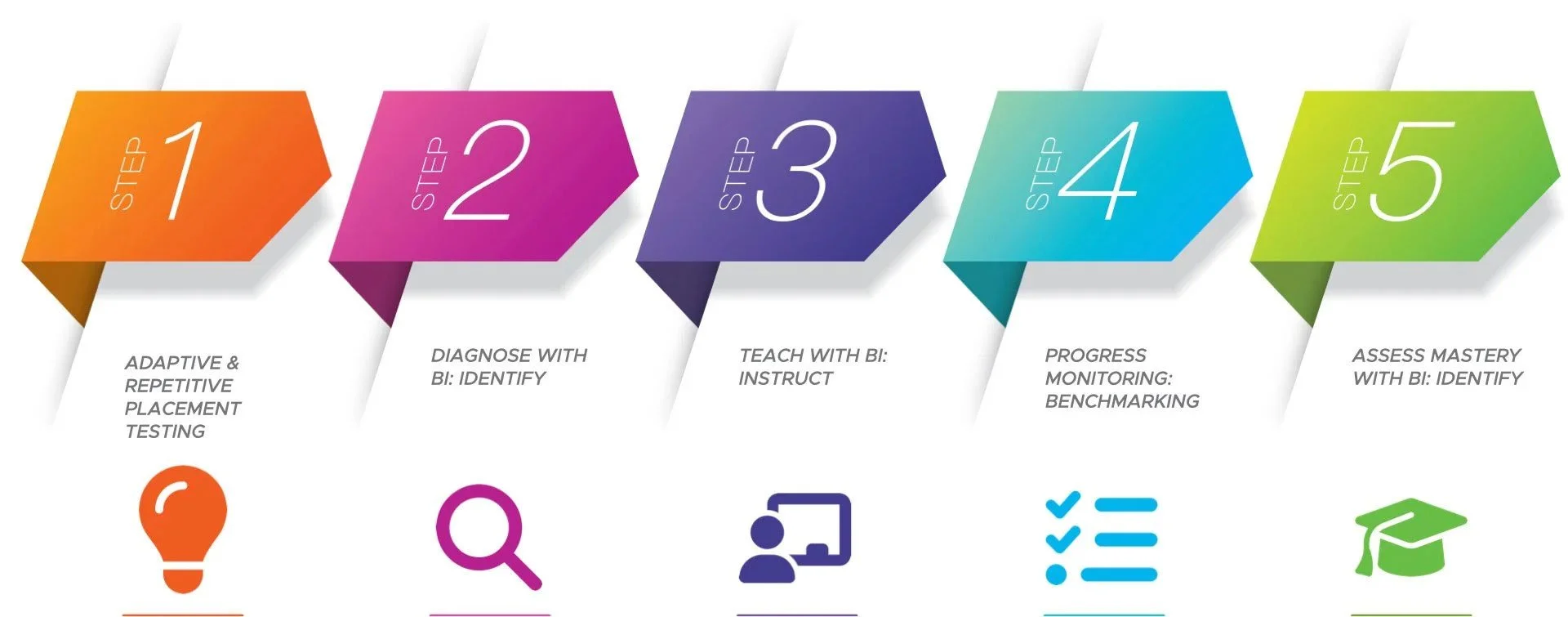
Using Bright Islands Complete Comprehension (CoCo) in Your Classroom
STEP 1
Adaptive & Repetitive Placement Testing: The Bright Islands CoCo program is based on reading comprehension ability, not year level. The adaptive and repetitive Placement Centre tests individual students’ comprehension levels and place them in the appropriate IDENTIFY & INSTRUCT reading level. More than one level may be represented within your class. The program was designed with this in mind, making it possible to teach multiple levels within the one classroom.
Note: If a student is placed in Level A in IDENTIFY, they should also be placed in Level A in INSTRUCT.
Conducting the Placement Test: The Placement Test is best conducted at either the end of the school year or at the beginning of the following year. See Assign Reading Level or Placement Test to assign or reset the Placement Test for your students. Teachers with School Administrator access rights can take control of the Placement Test Settings. If you would like a more vigorous test, you can choose 2 otherwise, 1 would be a good starting point. See the Placement Test Settings Guide for more information.
NEW The Intelligent Placement option will intelligently allocate the beginning placement level for the students based on their years of birth and any data from their previous reading levels (you do not need to manually direct your students to take a Placement Test).
Before your students take their Placement Test, you can confirm the student’s recommended placement level is appropriate to their reading ability. As a general starting point, Level AA correlates with Prep/Foundation year, Level A correlates to Year 1 and Level H with Year 8. If you know that your students have learning differences, you can change the initial placement level lower than the recommended one. For more information on reviewing and changing the student's recommended placement level, click here.
How to administer the Placement Test
- In the Placement Centre, students will be assigned to their individual placement level based on their year of birth. If you know that your students have learning differences, you can set the initial placement level lower than the recommended one. For more information on reviewing and changing the student’s recommended placement level, click here.
- Instruct students to click Start Test and complete the chosen Level Placement Test.
The Placement Test will take at least 45 minutes to complete. Completion times will vary as each student’s reading capability is different. If time is limited, teachers with School Administrator access rights can reduce the number of tests in the Placement Test Settings. If the student could not complete the placement test within the class period, they can stop and resume the Placement Test again at any time.
There will be times when Placement Test results are inconclusive and students might be required to take more Placement Tests to determine their suitable reading level. In these instances, students are required to take more Placement Tests to determine a suitable reading level for them. As each student's reading capability is different, it will take different amounts of time for each one of them to complete the tests.
As defined by the Placement Centre, a student's suitable reading level will be reached when they achieve a 50% to 90% correct response rate. If a student achieves less than a 50% correct response rate on the Placement Test, the Placement Centre will automatically and adaptively move down one placement level until a recommended reading level is reached. If a student achieves between a 50% to 90% correct response rate, they will be placed at the current placement level. If a student performs exceedingly well and achieves more than 90% correct response rate, the student will continue to move up one placement level until a recommended reading level is reached.
Once your students have completed their Placement Tests, a recommended reading level will be assigned to them on the Recommended column. The Status column will then display whether the student has maintained, struggled or excelled in the Placement Test.
Once the Placement Centre has placed the students in their designated IDENTIFY & INSTRUCT reading level, they should remain on that level for the entire school year, and therefore not be stretched beyond their abilities. If a student is really struggling, and it becomes clear after administering IDENTIFY Pretests that they are on the wrong reading level, move them back one level and keep them there for the rest of the school year. Additionally, if a student were to have a problem in attaining a reading level, they may also be assigned a more appropriate reading level directly. See the Assign Reading Level or Placement Test.
STEP 2
Diagnose with BI: IDENTIFY: Administer the five Pretests in the IDENTIFY module using Bright Islands CoCo to diagnose strengths and weaknesses in the 12 reading comprehension strategies in your students. Ideally complete one per day, as promptly as possible.
How to administer a Pretest
- Each Pretest is designed to take approximately 40 minutes to complete. Ensure the students read the passages carefully and don’t rush through the tests.
- In the first 30 minutes, have your students read the test, answer the 12 multiple-choice questions, and review the Student Achievement Chart which will provide a visual representation of their strengths and weaknesses.
- In the last 10 minutes, engage your class in feedback and discussion.
- Tell your students to complete the remaining four Pretests. At the same time, review either the IDENTIFY: Student Progress Report or IDENTIFY: Class Test Performance Report.
- Once all five Pretests are completed, have students fill in Self-reflection 1 and select the checkbox to send a copy to the registered teacher email address. This will be used for planning.
- Review the IDENTIFY: Student Summary Report (Pretest), IDENTIFY: Class Reading Strategy Individual Performance Report and IDENTIFY: Class Reading Level Summary Chart. See the IDENTIFY Class Reports Guide for other available IDENTIFY class reports.
- Complete your Student Planning Form (Pretest) for student discussion and goal setting. You can access the Student Planning Form on the student profile page under the individual student's reading level listing.
STEP 3
Teach with BI: INSTRUCT: After completing Pretest diagnostics based on the students’ areas of need, six specific strategy lessons will be automatically recommended for the students to complete in order to remediate areas that need reinforcement. After the students complete these lessons, they may conclude the review lessons by answering 12 selected-response questions that focus on the specific reading strategies. Once all six specific strategy lessons are completed, review the INSTRUCT: Class Lesson Performance Report. See the INSTRUCT Class Reports Guide for other available INSTRUCT class reports.
STEP 4
Progress Monitoring: Benchmarking: Throughout the year, students can be benchmarked with five Learning Checkpoints to identify those who may struggle with the reading strategies taught so far. Each test requires between 45–60 minutes to complete and discuss. These tests do not need to be completed consecutively. They should be issued when deemed suitable and used to identify students who are unable to grasp the strategy being taught. Once all five Learning Checkpoints tests are completed, review the IDENTIFY: Student Summary Report (Benchmark).
Teach with BI: INSTRUCT: Finish the remaining strategy lessons to build and reinforce the student’s basic knowledge of reading strategies. After the students complete the 12 lessons and four Review lessons, they will begin the Final Review that provides practice in all 12 reading strategies. Once all the strategy lessons are completed, review the INSTRUCT: Class Lesson Performance Report. See the INSTRUCT Class Reports Guide for other available INSTRUCT class reports.
STEP 5
Assess Mastery with BI: IDENTIFY:
- Upon completion of the INSTRUCT lessons and Final Review, use Bright Islands CoCo to administer the five Post Tests in the same way you administered the five Pretests.
- Have students complete Self-reflection 2 and send a copy to the registered teacher email address.
- Review the IDENTIFY: Student Summary Report (Post Test & Overall) and IDENTIFY: Class Reading Strategy Individual Performance Report.
- Complete your Student Planning Form (Post Test) for student discussion and goal setting. You can access the Student Planning Form on the student profile page under the individual student reading level listing.
- Direct students to their Student Achievement Chart so they can see an overview of their progress from Pretests to Benchmarks to Post Tests. The students can also review their overall star rating.
- Lastly, review the IDENTIFY: Class Reading Level Summary Chart to compare each test type of the class’s performance against the average test results.
Comments
0 comments
Please sign in to leave a comment.